## How I reached High Availability
## Introduction
[We left off](https://blog.bnei.dev/blog/road-to-self-hosted-kubernetes-cluster) on a high note. The Kubernetes cluster was alive. But as any engineer knows, a working system is often just the prelude to the next, more interesting problem. While the cluster was technically functional, its architecture had a hidden Achilles' heel: a single point of failure for all incoming traffic.
My mission was clear: eliminate it. The tool for the job was MetalLB, and the task seemed simple. I was wrong. What followed was a multi-day investigation down a deep and winding networking rabbit hole. This is the case file for that investigation—a detective story that starts with misleading TLS errors, leads to phantom network blocks, and ends with the unmasking of a culprit buried in the very foundation of my virtualization tools. Join me as we solve the case of the unreachable cluster.
## Act 1: The Initial High-Availability Goal
* **The Problem:** My self-hosted Kubernetes cluster had a single point of failure. My router could only forward traffic to one node's IP, defeating the purpose of a multi-node setup.
* **The First Idea:** Use a Raspberry Pi as a reverse proxy to distribute traffic.
* **The Expert Opinion:** This just moves the single point of failure to the Pi. The Kubernetes-native solution is to use MetalLB to provide a single, highly-available Virtual IP (VIP).
* **The First Fix:** We corrected my MetalLB configuration: moved the IP address pool to my main LAN subnet (`192.168.1.x`) and removed the `nodeSelector` to allow any node to become the leader for the VIP.
## Act 2: The Deceptive "It Didn't Work" Phase
* **A New Mystery Emerges:** After applying the MetalLB fix, my Traefik service was still stuck with its old IP address from the wrong subnet.
* **The Lesson:** Kubernetes services have "IP stickiness." MetalLB won't change an already-assigned IP.
* **The Solution:** We forced a reallocation by temporarily "toggling" the service type from `LoadBalancer` to `ClusterIP` and back again. This successfully assigned a new, correct VIP to Traefik.
## Act 3: The Real Problem Surfaces - The Wall of Errors
* **The Symptoms:** With the VIP correctly assigned, a new, more serious problem appeared. All external connections failed with an `SSL_ERROR_SYSCALL`, while my Traefik logs showed a cryptic `local error: tls: bad record MAC`.
* **The First Wrong Turn:** The `bad record MAC` error strongly suggested a "man-in-the-middle" device corrupting TLS packets. We suspected an overly aggressive firewall on my router or VMs host.
* **The Plot Thickens:** I confirmed it wasn't my main internet router, because the bad `record MAC error` still occurred when connecting from another computer on my local network, proving the traffic corruption was happening closer to the cluster. Then, `ping`ing the VIP revealed an even deeper issue: `Destination Host Unreachable`. We couldn't even reach the IP at a basic network level.
## Act 4: Chasing Network Ghosts
* **The Second Wrong Turn:** An "unreachable" host means no ARP reply. We hypothesized that Cilium's firewall was blocking MetalLB's ARP announcements. We even drafted a `CiliumNetworkPolicy` to allow the traffic.
* **The Breakthrough Clue:** The `arp -a` output showing a **successful** ARP entry for the VIP and logs showing MetalLB *was* announcing the service. ARP wasn't the problem after all. The node was reachable at Layer 2.
* **The Smoking Gun:** The next step was a `tcpdump` on the leader node. The packet capture revealed the definitive truth:
1. The request packet arrived correctly on interface `eth1` (my main LAN).
2. The reply packet tried to leave through a completely different interface, `eth0`.
3. A stateful firewall (the VMs host itself) saw this mismatched reply, dropped it, and killed the connection.
* **The Diagnosis:** We had found the true culprit: **Asymmetric Routing**.
## Act 5: The Final Culprit and The Fix
* **The Final Piece of Evidence:** Reviewing the `ip route` table of my VM, which confirmed the diagnosis. My node's default route was incorrectly pointing to the `eth0` interface, a private management network created by Vagrant.
```
default via 192.168.121.1 dev eth0
```
* **The Root Cause:** This is a fundamental quirk in Vagrant's design. It requires a management NAT network, which competes with any bridged network for the default route, creating the asymmetric routing problem.
* **The Test:** We proved the fix with a temporary command to manually delete the bad route and add the correct one. It worked instantly.
```bash
sudo ip route del default && sudo ip route add default via 192.168.1.254 dev eth1
```
* **The Permanent Solution:** I codified this fix in my `Vagrantfile`, using a shell provisioner set to `run: "always"` to enforce the correct default route on every single boot.
## Epilogue: The Domino Effect
* With the routing fixed, the cluster could finally talk to the internet, which solved the very first problem we saw: the failing `ClusterIssuer`.
* `cert-manager` was now able to contact Let's Encrypt, issue a valid certificate, and Traefik began serving it correctly.
* All the TLS errors vanished, and the cluster was fully, correctly, and reliably online.
## Lessons learned
* **Address Single Points of Failure (SPOF) Systematically:** Our journey began with eliminating an SPOF. The lesson is to always pursue robust, architecturally sound solutions (like Kubernetes-native MetalLB) rather than simply moving the SPOF to another component.
* **Networking Troubleshooting: Follow an L7-to-L2 Approach (Iteratively):**
* **Application & Service Layer (L7/K8s):** Begin with application logs (Traefik), service status, and certificate validity (`cert-manager`). Confirm what the application *thinks* is happening. Verify Kubernetes service-specific config (like `externalTrafficPolicy` or whether a `LoadBalancerIP` is `sticky`).
* **Network Policy & Stateful Firewalls (L3/L4):** Check CNI policies (Cilium), host iptables, and any VM/hypervisor firewalls. These often silently drop connections based on state.
* **Basic IP Connectivity (L3):** Use `ping` for reachability and `traceroute` for path. If `ping` fails with "Destination Host Unreachable," always check Layer 2.
* **`arp -a` is Critical for L2 Diagnostics:** When basic `ping` fails, `arp -a` confirms if the IP is even resolving to a MAC address. A successful ARP reply shifts the focus immediately to routing or higher-layer issues.
* **`ip route` Maps Your World:** If ARP works but traffic still fails, inspect the host's routing table. Misconfigured default gateways, competing routes, or incorrect interface assignments (`eth0` vs. `eth1`) are common culprits for asymmetric routing.
* **`tcpdump` is the Ultimate Truth Serum (L2-L7):** When logs mislead and pings don't tell the whole story, `tcpdump` reveals precisely what packets are arriving, leaving, and being dropped. It was the definitive tool that exposed the asymmetric routing.
* **Know Your Tools' Hidden Quirk:** Understand the default behaviors of your infrastructure tools. Vagrant's automatic management network (`eth0`) creating a competing default route was the hidden antagonist in our debugging journey.
* **Trust But Verify, Always:** Don't assume. Don't assume a `LoadBalancer` IP will change automatically. Don't assume your router isn't interfering. Don't assume a `ping` failure means ARP is broken. Test and get concrete data for every assumption.
---
## From Engineer to Architect: The CUBE Method for High-Impact Answers
You’re in the final interview for a Senior Platform Engineer role. You’re at the whiteboard. The CTO leans forward and asks, "How would you design our observability strategy from scratch?"
You know the tools. You've done this before. Confidently, you dive straight in : "I'd use Prometheus for metrics, Loki for logs because it's cost-effective, OpenTelemetry for tracing...".
The CTO cuts you off. "I don't need a list of tools. I asked for a *strategy*."
At this moment, you realise that something is missing. You don't need more knowledge, you need a way to organise and structure this knowledge and produce *your* response. They want to see how *you* think, about trade-offs, business value, about risk. After strugling with this myself, I am proposing a mental framework called the **CUBE method**, ensuring you deliver architect-level answers every time.
*(Disclaimer: I am not yet an architect myself, but it is my career goal, and I am actively working toward it. This post aims to share strategies I have found useful on my journey.)*
## Why a Mental Framework ?
In a high-pressure situation, our brain tends to grab the most familiar information first : the technical details. We dive into a rabit hole of technologies and application, and we can loose track of the purpose, the business aspect, long-term maintenance burden... A mental framework acts as a checklist, a structured algorithm that guides our thinking.
It makes you pause and ponder, zoom out, analyse a problem from multiple critical angles *before* speaking. This helps us craft a more complete solution, but als structures our communication, making our answer logical, persuasive, and have a clear progression.
## The CUBE Method Exlpained
**CUBE** is an acronym for four pillars of architectural thinking. Before answering any design question, we can mentally run through these four filters.
### C - Cost & Business Impact
Technology serves the business. An architect's first question should be about value.
- **Cost:** What is the Total Cost of Ownership (TCO) ? Is there an upfront investment vs. long-term operational cost?
- **Business Value:** How does this choice accelerate the **Time-to-Market**? Does it reduce operational overhead (**MTTR**, etc.)? Will it make us save money?
### U - Upkeep & Usability
A brilliant solution that is impossible to maintain is a liability. We need to consider the human factor.
- **Maintainability:** How will we monitor, debug and observe this system ?
- **Developer Experience (DX):** How does this choice affect our developpers' daily lives ? Does it reduce their cognitive load or add to it ?
- **Disaster Recovery:** What is our recovery plan when it fails ?
### B - Bulletproof security
Security is not a feature, it's a prerequisite. Think like the bad guy.
- **Attack Surface:** Does this increase or decrease our exposure ?
- **AuthN/AuthZ:** How do we manage identity and permissions ?
- **Secrets & Compliance:** How are secrets, keys and certificates managed ? Do we meet compliance standards like GDPR ?
### E - Elasticity & Efficiency
The system must be resilient, performant and scalable under real-word conditions.
- **Scalability:** How does it handle load? What are its bottlenecks ?
- **Reliability:** Is it fault-tolerant? What are its single points of failure?
- **Performance:** What are the latency and throughput characteristics?
## Applying CUBE: A Real-Word Example
Let's go back to our CTO's question:
> 'What is your **minimal, viable observability strategy** for a new, high-stakes project with a tight budget?'
Here's how we answer using the CUBE framework to structure our thinking :
'That's a critical question. My strategy wouldn't be to adopt every tool at once, but to layer our capabilities based on the highest vaue-to-cost ration. I'd approach it in three pragmatic phases :
**Phase 1: Foundational Reliability with Metrics**
Our first priority is answering the question, "Is the system online and healthy?"
- Therefore, my Day 1 action is setting up **Metrics** with Prometheus and Grafana. It gives us a real-time 'electrocardiogram' of the system (CPU/RAM, latency, request rates). This is our baseline for **(E) Reliability** and lets us create proactive alerts. It's the cheapest and fastest way to mitigate the **(C) Business Cost** of a total outage because we can see a problem before our customers do.
**Phase 2: Efficient Debugging with Logs**
Once an alert fires, we need to answer, "Why did this happen?"
- This is where **Logs** are essential. To manage **(C) Costs**, I would implement centralized logging with Loki, not ELK. Loki's architecture is much cheaper to run. This directly improves our **(U) Upkeep** by giving developers the context they need to debug failures quickly, improving our **MTTR** without a massive infrastructure investment.
**Phase 3: Surgical Security & Performance Audits with Tracing**
Finally, once the system is stable, we need to answer complex questions like, "Where is the bottleneck?" or "Did that request follow an authorized path?"
- This is the role of **Distributed Tracing** with OpenTelemetry.
- The **(C) Cost** of tracing is high, so we control it by implementing **aggressive sampling** (e.g., recording only 1 in 1,000 requests).
- Its primary value is twofold: for deep **(E) Performance** analysis to optimize slow transactions, and for **(B) Bulletproof Security**. A full trace provides an immutable audit trail, allowing us to perform forensic analysis after a security incident or detect anomalous, unauthorized interactions between services. We introduce this last because its value shines brightest once we have a stable and scaling system.
## The Result
By structuring our answer this way, we did several things:
- We answered the *strategic* question, not just the technical one.
- We demonstrated a pragmatic, cost-conscious mindset.
- We justified every choice with a clear trade-off.
We did not just give a right answer. We proved we *think* just like an architect. And this time, the meticulous CTO simply nods, impressed.
---
## Road to self-hosted Kubernetes Cluster
## Introduction
For as long as I can remember, I’ve been fascinated by systems—how they work, how they break, and how they can be made better. As a developer, I’ve always sought ways to streamline my workflows and take control of my tools. That’s why I decided to build my own Kubernetes cluster at home. Driven by my passion for **systems** and **coding**, I wanted to create a self-owned cloud. I also believe that individual control of digital infrastructures leads to a more balanced world.
Setting up everything myself — from installing the OS on blank machines to deploying apps using GitOps — was an incredible learning experience. Whether you're a technical expert or a curious wanderer, you can follow my thought process and get a practical understanding on how to set up a Kubernetes cluster.
## Hardware
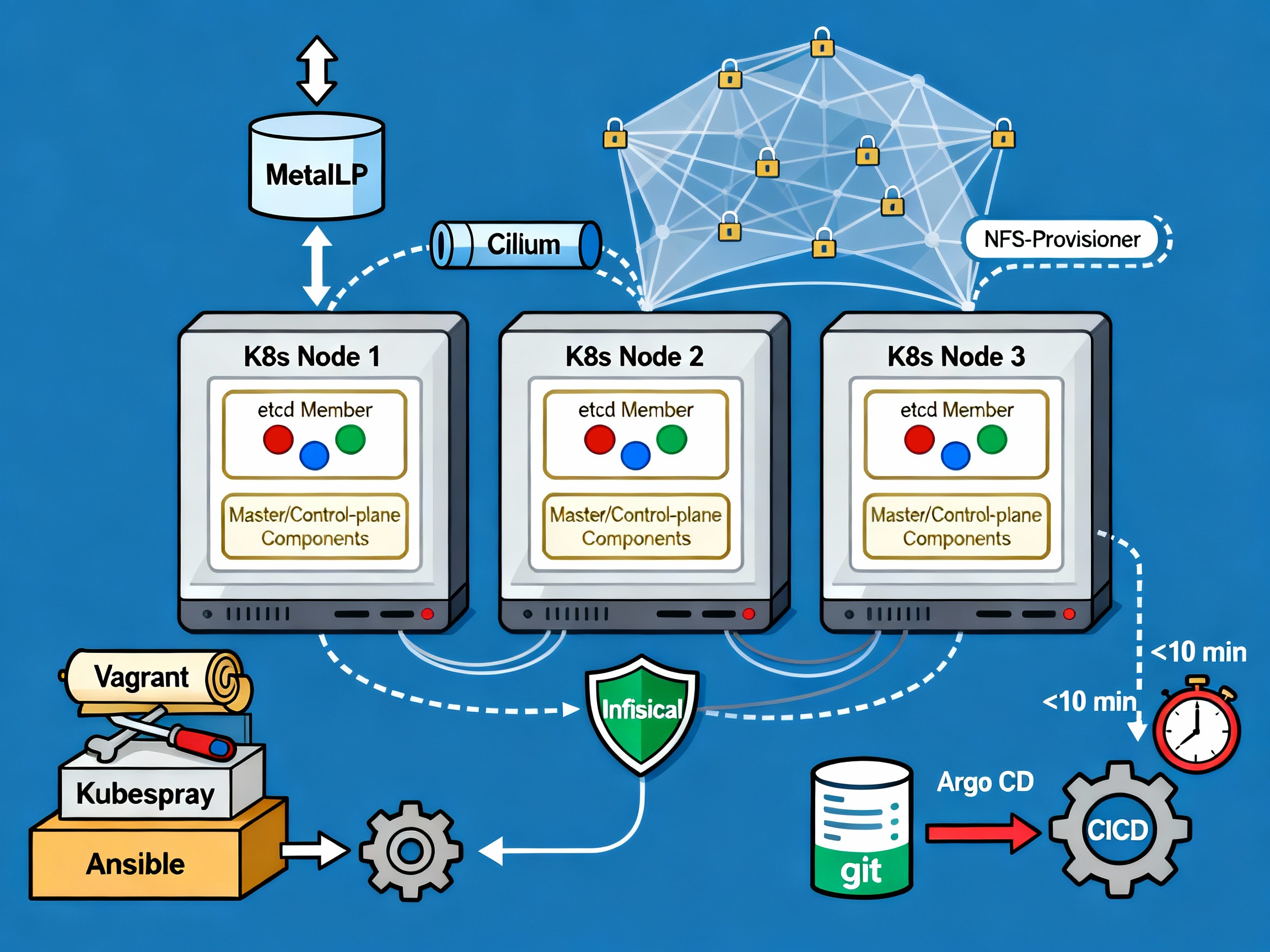
My father gave me his old computer, with an i5, 32Gb ram. I added my old laptop with an i7, 16Gb ram . On both machines, I installed :
- **Debian 12**
- My **zsh shell** (oh-my-zsh, some plugins, powerlevel10k)
- **Tmux** for session management
- **SSH**. I read somewhere that lots of bots are scanning open ports for SSH brute force hacking, so I :
- Changed the default port
- Enabled private key authentification only
- Added X11 forwarding for GUI support (primarly for VMs and Timeshift backups).
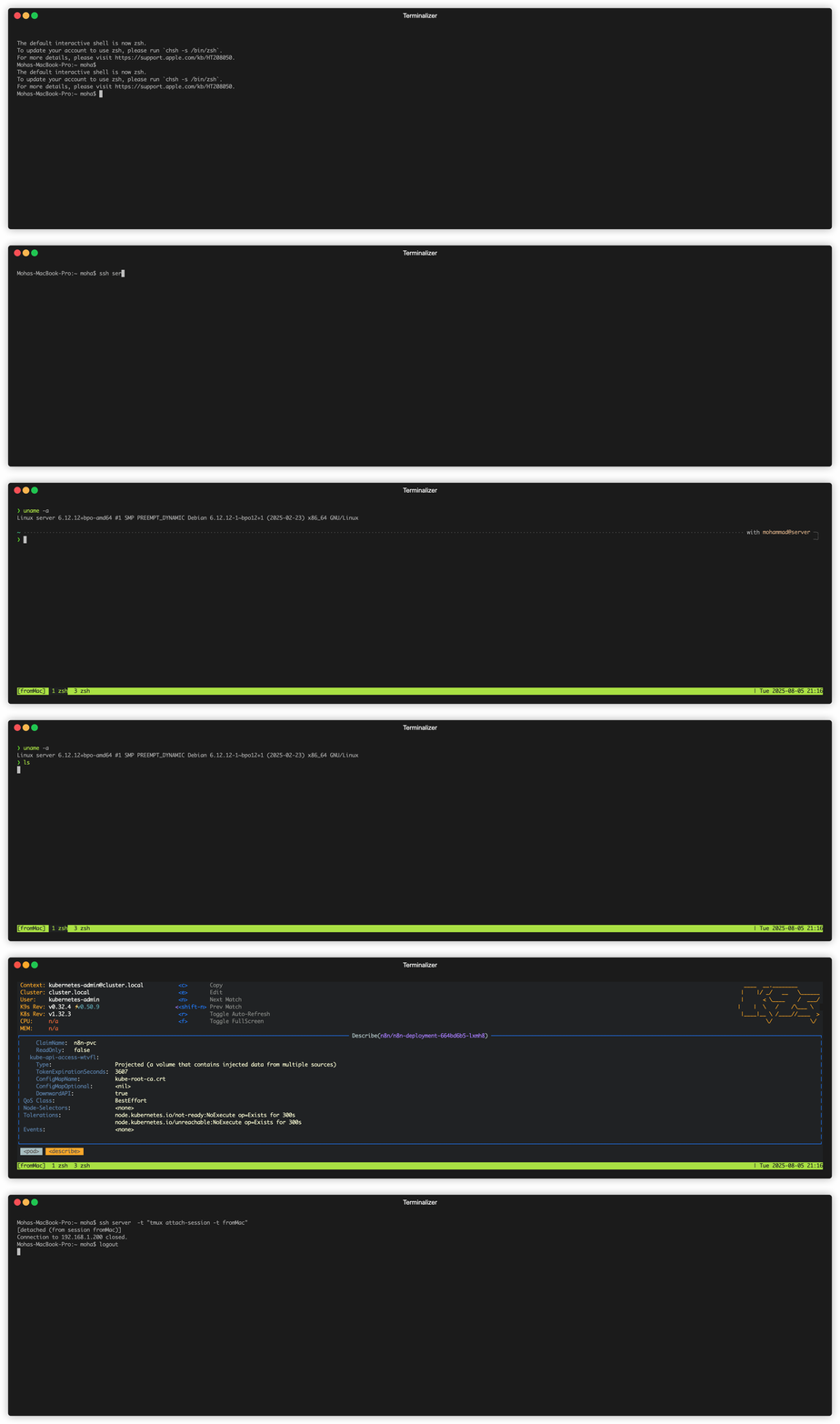
Having a comfortable setup is crucial to me, it reduces unnecessary complexity when troubleshooting problems. Now that we can easily connect and manipulate our servers, let's talk a bit about networking.
### Network
In my home, we have a basic router with a commercial ISP. I requested our **IP to be static**, and created forward rules for SSH (on my custom ports), HTTP/S, and some mailing ports (requested our ISP to open port 25).
At this point, I should have spent more time setting up a **private DNS** to easily identify my machines, set up **network traffic monitoring** and a **private certificate authority**. You should do it if you are planning to create your own infrastructure like me !
Since networking is my weak point, I imagined a simple setup for my cluster : dad's server acts as the entry point, all ingress traffic to the cluster will pass through the i5 server (more on that later).
```mermaid
graph TD
subgraph Network global view
ISP(ISP)
HomeRouter(Home Router)
DadsComputer("Dad's computer")
OldLaptop("Old laptop")
ISP ---|gives static ip| HomeRouter
HomeRouter ---|SSH| DadsComputer
HomeRouter ---|SMTP| DadsComputer
HomeRouter ---|HTTP/S| DadsComputer
HomeRouter ---|SSH| OldLaptop
end
```
## VMs
With my initial setup completed, I was ready for my next challenge: **virtual machines**. Running the cluster directly on bare metal wasn’t ideal for me — I wanted the flexibility to test multiple configurations and easily destroy or recreate setups. Here’s how I approached it:
### VM Configuration
* **2 VMs per machine**
* Each with **2 CPUs** and **8Gi of RAM**
* **Bridged IP address**. The bridge was really useful for my VMs to have their own IP addresses given to them by my router. This way, they appear as separate machines on my network and can easily communicate with each other.
[bridge configuration raw markdown link](https://raw.githubusercontent.com/MohammadBnei/shell-config/refs/heads/main/netplan.md?token=GHSAT0AAAAAAC72IR522GB534DWJMAA3TFE2ETJ76A)
### Virtualisation tools
- **KVM (Kernel-based Virtual Machine)**. Bypass the hypervisor and run the vm directly on the host kernel. Not compatible with all cpus.
- **Virsh (Libvirt)**. Handles the heavy lifting of the virtualisation management.
### Infrastructure As Code
As a good developer, I absolutely needed **IaC** (Infrastructure as Code) to have automatisation, versioning, and iterative update. I opted for **Vagrant** over **Terraform** primarily because of its cleaner Ruby syntax, and also because of its focus on VM (while terraform excels at cloud infrastructure). Both are HashiCorp tools. Here is the Vagrantfile for my 2 first VMs :
```ruby
Vagrant.require_version '>= 2.0.4'
$num_node = 2
Vagrant.configure("2") do |config|
config.vm.box = "generic/debian12"
config.vm.provision "shell", inline: <<-SHELL
sudo apt-get update
sudo apt-get install -y nfs-common
SHELL
(1..$num_node).each do |i|
config.vm.define "k8s-#{i}" do |node|
node.vm.provider "libvirt" do |v|
v.memory = 8192
v.cpus = 2
end
node.vm.network "public_network",
:ip => "192.168.1.18#{i}",
:dev => "br0",
:mode => "bridge",
:type => "bridge",
:mac => "5A74CA28570#{i}"
node.vm.network "private_network", ip: "192.168.10.5#{i}"
end
end
end
```
Initaly, I wanted to use *flannel* as the OS. It's specialised for containers. But i could not get it to work ! So i switched back to what I know, **Debian**.
Getting **Libvirt** and **vagrant** to work together required specific version of vagrant, and env variable configuration. I left vagrant default security (for SSH connections) which uses private key, and I set via Libvirt the VMs to auto-start.
```mermaid
graph TD
HR(Home Router)
subgraph Dad_s_computer ["Dad's computer"]
Eno1_Dad["eno1
(default interface)"]
Br0_Dad["br0
(bridged interface)"]
VM1("VM 1
192.168.1.181
2 cpu
8 Gb ram")
VM2("VM 2
192.168.1.182
2 cpu
8 Gb ram")
Br0_Dad --> VM1
Br0_Dad --> VM2
end
subgraph Old_computer [Old computer]
Eno1_Old["eno1
(default interface)"]
Br0_Old["br0
(bridged interface)"]
VM3("VM 3
192.168.1.191
2 cpu
8 Gb ram")
VM4("VM 4
192.168.1.192
2 cpu
8 Gb ram")
Br0_Old --> VM3
Br0_Old --> VM4
end
HR -- default connection --> Eno1_Dad
HR -- "router to vm through bridge" --> Br0_Dad
HR -- default connection --> Eno1_Old
HR -- "router to vm through bridge" --> Br0_Old
```
## Cluster Installation
### Kubespray
Now that I have my hardware, network, and VMs ready, let's move on to actually installing the Kubernetes cluster.
I initially used a basic [**Kubeadm**](https://kubernetes.io/docs/setup/production-environment/tools/kubeadm/high-availability/) script injected into my control node VM to set up the cluster. But this was cumbersome, as I had to then manually add the nodes and install the required tools (CNI, CRI, LB…). Stumbling upon [**Kubespray**](https://kubespray.io/), it was the perfect solution. Open source, Ansible-based, fully configurable. Getting it to work was a pleasure because of the clear documentation and configuration only process.
[Kubespray](https://kubespray.io/) makes it easy to install, manage and upgrade clusters. We can add/remove nodes or applications (argoCD, krew…), and configure vital parts of our cluster (CNI, provisioner, load balancer…). For my needs, I used :
- [Cert-manager](https://cert-manager.io/) with fallback DNS servers because I had issues with unresolved DNS names on my services
- [Cilium](https://cilium.io/) as my network plugin (CNI). I may test ePBF one day, it seems like a really cool technology
- [MetalLB](https://metallb.io/) as my bare metal load balancer. I had to label my server 1 nodes to enable metalLB only on them, for the purpose of having a single entry point
- 2 control planes, 3 etcd replicas
Hosts (and control node) configuration :
```yaml
all:
hosts:
node1:
ip: 192.168.1.xxx
node2:
ip: 192.168.1.xxx
node4:
ip: 192.168.1.xxx
node5:
ip: 192.168.1.xxx
children:
kube_control_plane:
hosts:
node1:
node2:
kube_node:
hosts:
node1:
node2:
node4:
node5:
etcd:
hosts:
node1:
node2:
node4:
k8s_cluster:
children:
kube_control_plane:
kube_node:
```
MetalLB configuration :
```yaml
# MetalLB deployment
metallb_enabled: true
metallb_speaker_enabled: "{{ metallb_enabled }}"
metallb_namespace: "metallb-system"
metallb_version: 0.13.9
metallb_protocol: "layer2"
metallb_config:
speaker:
nodeselector:
kubernetes.io/os: "linux"
metallb-speaker: "enabled" # to select only server 1 nodes
tolerations:
- key: "node-role.kubernetes.io/control-plane"
operator: "Equal"
value: ""
effect: "NoSchedule"
controller:
nodeselector:
kubernetes.io/os: "linux"
metallb-controller: "enabled" # to select only server 1 nodes
tolerations:
- key: "node-role.kubernetes.io/control-plane"
operator: "Equal"
value: ""
effect: "NoSchedule"
address_pools:
primary:
ip_range:
- 192.168.xx.10-192.168.xx.50 # don't need more than probably 20 ips
auto_assign: true
layer2:
- primary
```
```mermaid
graph TD
%% External Components
Internet[Internet] --> MetalLB
%% Nodes
subgraph Kubernetes Cluster
subgraph Control Plane
Node1["Node1 (Control Plane)"] --> MetalLB[MetalLB]
Node2["Node2 (Control Plane)"] --> MetalLB
end
subgraph Worker Nodes
Node3["Node3 (Worker)"]
Node4["Node4 (Worker)"]
end
end
%% Connect Components
MetalLB --> Node3
MetalLB --> Node4
%% Labels and Annotations
style MetalLB fill:#90EE90,stroke:#333,stroke-width:2px
style Node1 fill:#ADD8E6,stroke:#333,stroke-width:2px
style Node2 fill:#ADD8E6,stroke:#333,stroke-width:2px
style Node3 fill:#ADD8E6,stroke:#333,stroke-width:2px
style Node4 fill:#ADD8E6,stroke:#333,stroke-width:2px
style Internet fill:#D3D3D3,stroke:#333,stroke-width:2px
%% Sub-labels
MetalLB -.-> MetalLBLabel["Layer 2 Mode IP Range: 192.168.xx.10-192.168.xx.50"]
```
Then, all I had to do was run the ansible script and after some time, my **Kubernetes cluster was up** ! With the cluster running, I focused on installing the *essential tools* to make it accessible, manageable, and user-friendly.
### Required Tools
Now, I need to install the required tools to manage my applications on the newborn cluster.
First, the **reverse proxy** : where and how to route user traffic based on **urls**, **host** and rules. I chose [**Traefik**](https://traefik.io/) because I had some experience with it, and for its basic but powerful capabilities. Installing it with helm was a breeze. Since I have multiple domain names I must manage my certificates separately. For now, I use **IngressRoute** CRDs, but I plan on moving to **GatewayAPI** in the next few months.
Next, I need to have storage ready for my pods’ volume. I created an **NFS folder** on my server1, and used the [Kubernetes nfs provisioner](https://github.com/kubernetes-sigs/nfs-subdir-external-provisioner) to setup my **default storage class**. As the default, any Persistent Volume (Claim) will use this storage. NFS was ideal because of the multiple machines running my cluster, they had to find a way to communicate on the same storage space.
For the **secrets**, I used [**Infisical**](https://infisical.com/). It has a Kubernetes operator which injects secrets as **env variables** or as **files** for maximum security if needed. It's connected to my Postgres instance (more on that later), and posed no significant challenges.
Finally, **GitOps** is a must. With [**ArgoCD**](https://argo-cd.readthedocs.io/en/stable/) in place, I have the **CD** of my pipelines **automatically deploying** the resources to my cluster and **keeping them in sync** with my Github repos. Adding the secret key to access private repository, correctly setting up kustomize to handle the versioning were some of the challenges. I had syncing issues with Infisical secrets because of the polling performed by the secret watcher, which made argoCD believe the resources was never fully synced. I resolved this by managing the secrets manually.
```mermaid
graph TD
%% External Components
GitHub[GitHub Repo] --> ArgoCD
%% Nodes
subgraph Kubernetes Cluster
subgraph Control Plane
Node1["Node1 (Control Plane)"] --> Infisical[Infisical]
Node1 --> ArgoCD[ArgoCD]
Node1 --> NFS[NFS Storage]
end
subgraph Worker Nodes
Node3["Node3 (Worker)"] --> Traefik[Traefik]
Node4["Node4 (Worker)"] --> Traefik
end
end
%% Connect Components
Traefik --> KubernetesPods[Kubernetes Pods]
NFS --> PersistentVolumes[Persistent Volumes]
Infisical --> KubernetesPods
ArgoCD --> KubernetesManifests[Kubernetes Manifests]
%% Labels and Annotations
style Traefik fill:#90EE90,stroke:#333,stroke-width:2px
style NFS fill:#FFA07A,stroke:#333,stroke-width:2px
style Infisical fill:#DDA0DD,stroke:#333,stroke-width:2px
style ArgoCD fill:#DDA0DD,stroke:#333,stroke-width:2px
style Node1 fill:#ADD8E6,stroke:#333,stroke-width:2px
style Node3 fill:#ADD8E6,stroke:#333,stroke-width:2px
style Node4 fill:#ADD8E6,stroke:#333,stroke-width:2px
style GitHub fill:#D3D3D3,stroke:#333,stroke-width:2px
%% Sub-labels
Traefik -.-> TraefikLabel["Routes traffic based on URLs
Manages IngressRoute CRDs"]
NFS -.-> NFSLabel["Default Storage Class Shared storage for Pods"]
Infisical -.-> InfisicalLabel["Injects secrets as env vars/files
Connected to PostgreSQL"]
ArgoCD -.-> ArgoCDLabel["Syncs Kubernetes manifets
Uses Kustomize for versioning"]
```
There was a lot of trial and errors to achieve this stable configuration. As a developper, I focused on the **application side** and wanted to develop my APIs with ease. I created a [github template repo](https://github.com/MohammadBnei/home-server-go-api) for golang apis with the right Github action workflows and Kubernetes manifest to really focus on the functionalities.
I still need to upgrade my security and observability : since I don't have a lot of users (mainly family and friends), I don't have the immediate need for telemetry, metrics and security. But to learn, I will focus on these parts for the next iteration of my cluster upgrade, with tools like **[OpenTelemetry](https://opentelemetry.io/)**, **[Grafana](https://grafana.com/)**, **[Prometheus](https://prometheus.io/)**, **[Jaeger](https://www.jaegertracing.io/)** or **[Checkov](https://www.checkov.io/)**.
## Database
Kubernetes is **stateless** in nature. Data is **stateful** in nature. I felt there was an **incompatibility** in running any **database in my cluster**. It also complicates **retry and error** handling (for the whole cluster), even with Persistent Volumes in place. To ensure stability and performance, I created a **dedicated VM for my database** — isolating it from the Kubernetes cluster.
After searching for solutions, I found **[Pigsty](https://pigsty.io/)**, a **[Postgres for everything](https://postgresforeverything.com/)** database setup tool. It handles clusters and node, I can manage extensions like `pg_vector`, users and integrate tools like minIO (S3 bucket) or ferretDB (mongoDB). **Postgres** is a great database, open source, open to plugins because of its architecture (extensible without having to touch the core).
```yaml
# Example of a database with the pgvector extension, allowing RAG for AI agents
- name: n8nuserdb # REQUIRED, `name` is the only mandatory field of a database definition
comment: n8n user db # optional, comment string for this database
owner: dbuser_n8n # optional, database owner, postgres by default
extensions: # optional, additional extensions to be installed: array of `{name[,schema]}`
- { name: vector, schema: public }
```
It uses **Ansible and YAML** configuration files to manage the cluster. Then I simply run commands like `bin/pgsql-user pg-meta dbuser_xxx` to add a user to the database (but also to the Pgbouncer). Many of the commands are **idempotent**! It feels like a natural continuation of my toolset, as it's similar to Kubespray but for the Postgres world.
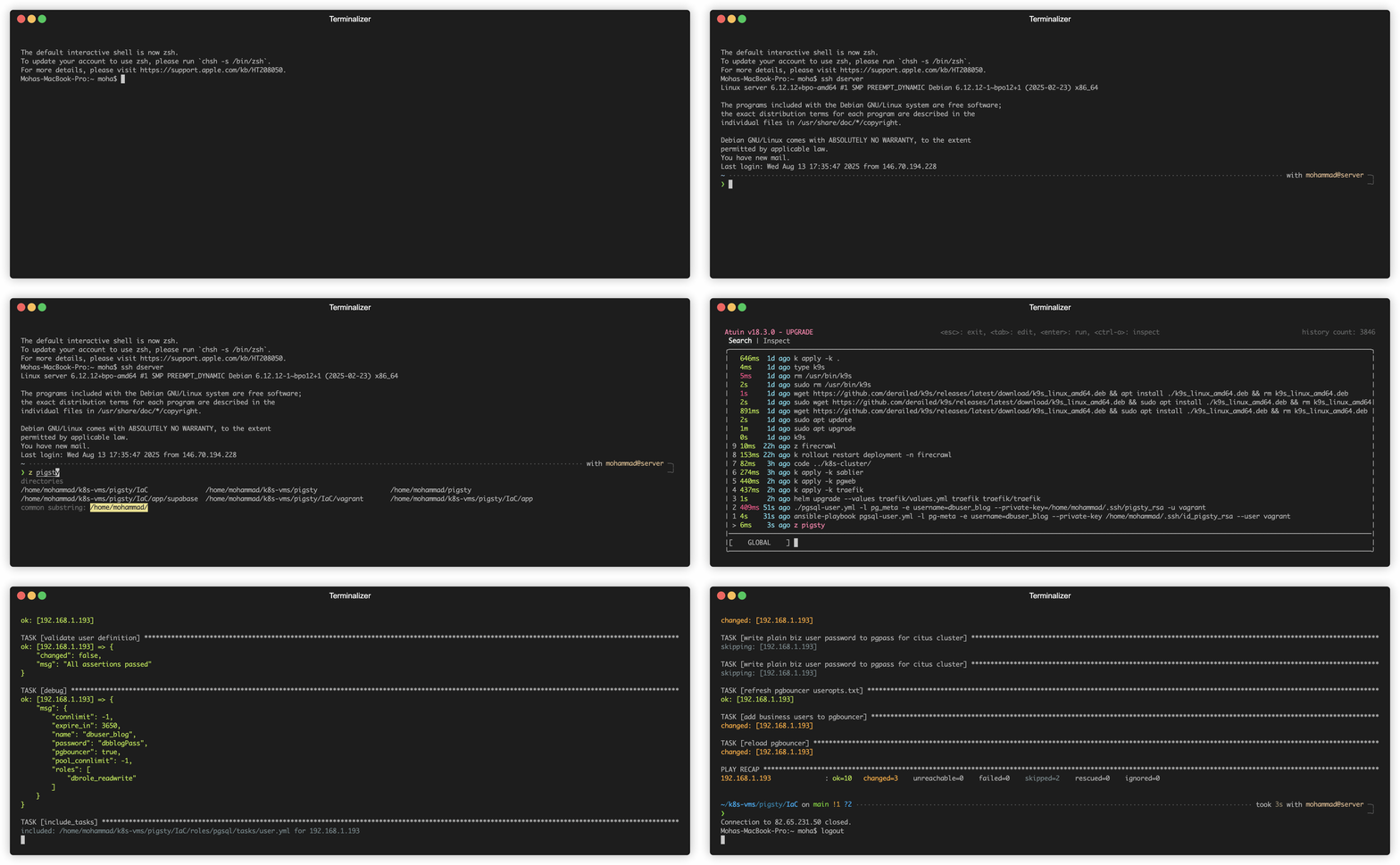
I went on and created a VM, with the 2 CPUs, 8 Gb memory and rocky9 image.
It's been great, but since all my data is on it, I am **terrified of upgrading**!
My next goals for the database domain are :
- upgraded **security** and **monitoring**
- **create new nodes** for replication and backup
- have a better understanding of the **pigsty ecosystem** and commands
Alright. I think we have everything. Let's have some fun now.
## Apps and APIs
I love **building things**, and I love *things that help me build things*. So I started with **[N8N](https://n8n.io/)**, a workflow building application that is fitted to **connect AI agents** to a large set of **tools** like Gmail/SMTP, Calendar, Clickup, Telegram, Postgres databases...
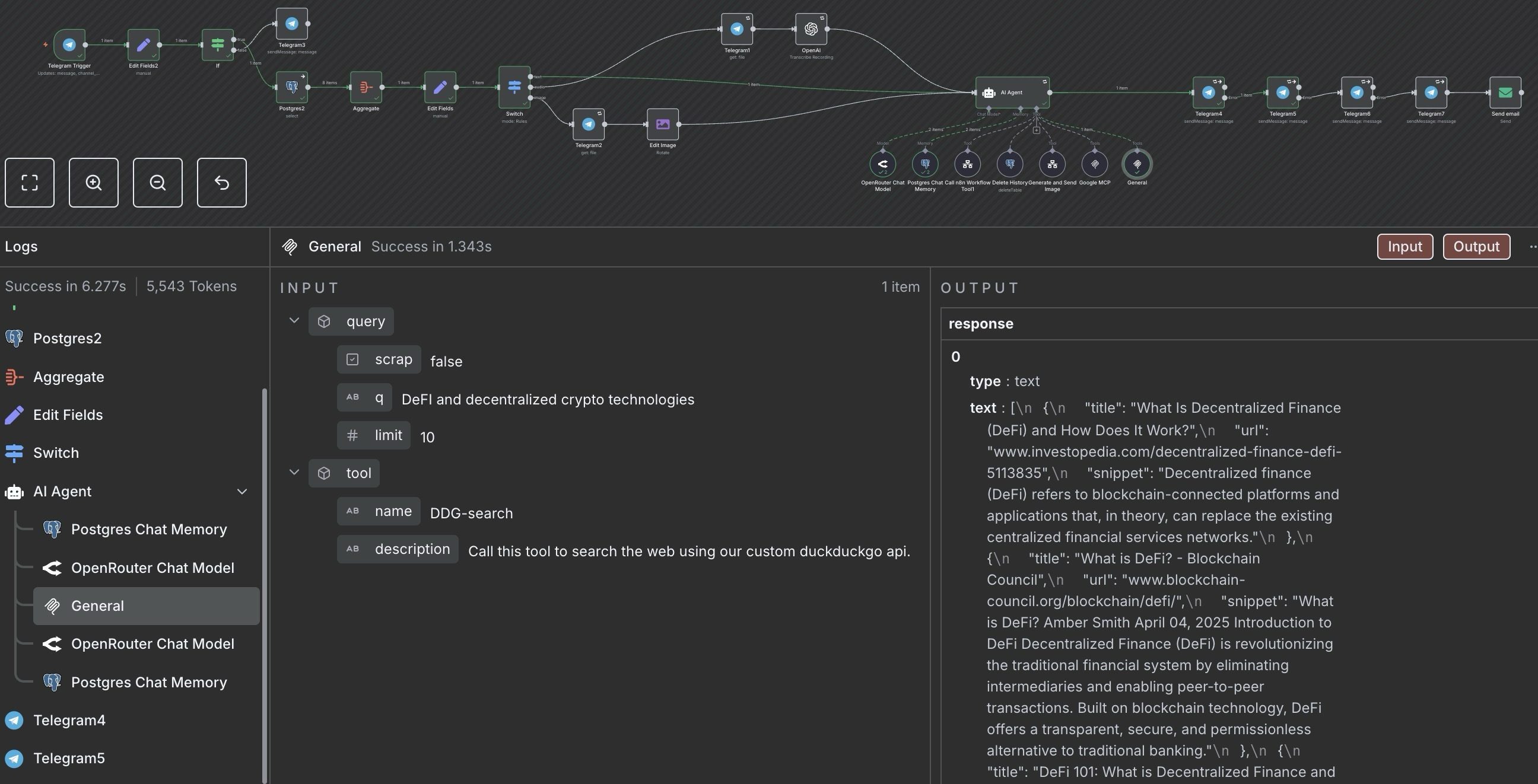
For example, I created a **gemini AI agent** with access to my **Google tools** (Gmail and Calendar mainly), to **web searches** (with my own duckduckgo api), and my textual data (as vectors in a RAG DB). I can **send email with a telegram message** now!
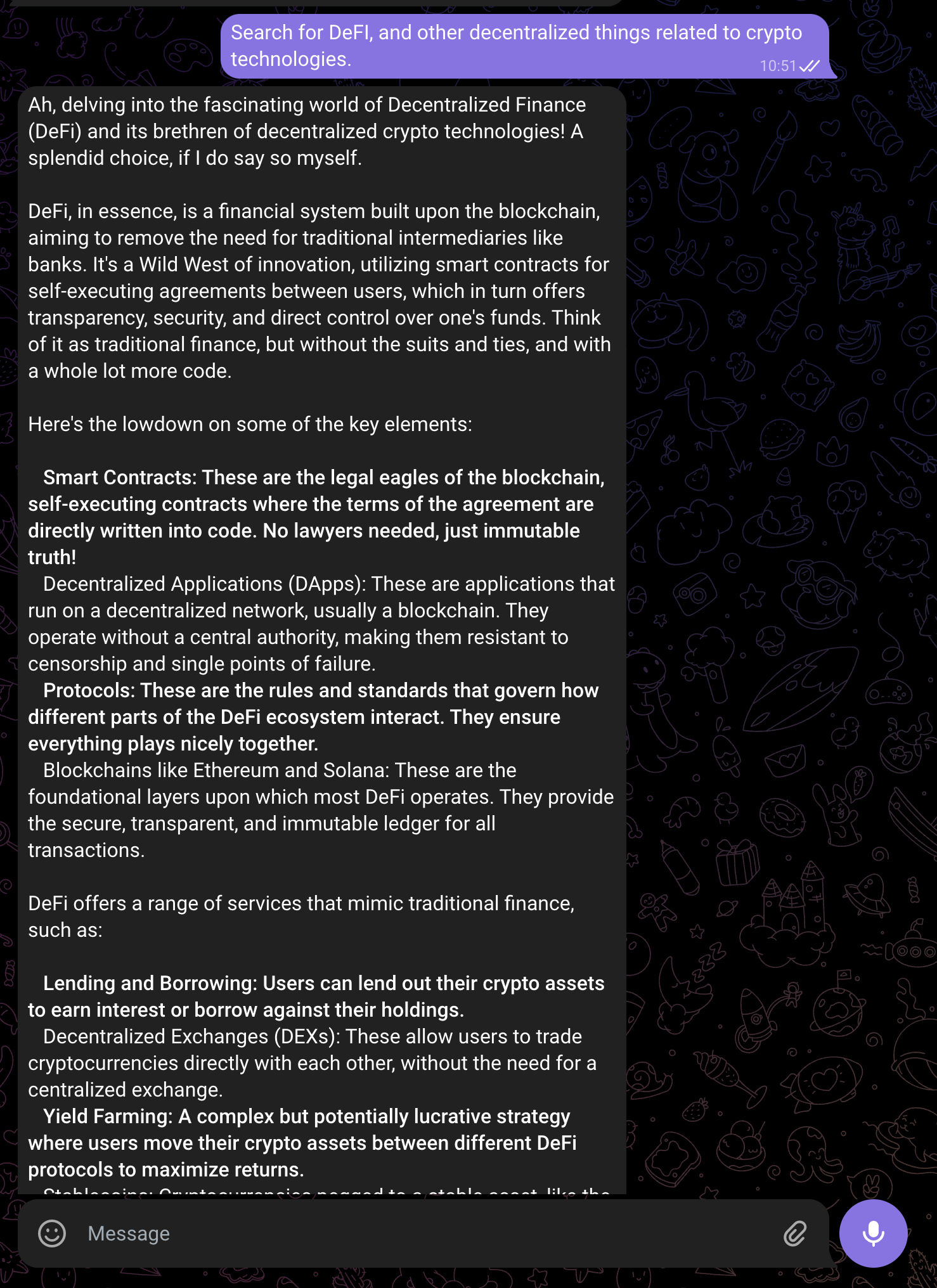
_Caption: My Gemini AI agent connected to Google tools and DuckDuckGo search API._
Beyond workflow automation, I've extended my AI capabilities with:
- [**Openwebui**](https://docs.openwebui.com/), a chat ui that can connect to any provider and add a lot of extensibility (RAG, Tools, Web Search...)
- [**Firecrawl**](https://docs.openwebui.com/), a web scrapper, crawler and content extractor
- [**Ollama**](https://ollama.com/) on my gaming computer (not technically a part of the cluster) and I run models up to 8B parameters (plenty enough for *deepseek-r1*, *qwen3* or *gemma3*).
Here is a concise list of the other apps I host :
- [**Wekan**](https://github.com/wekan/wekan), my trello board
- [**DDG-search**](https://github.com/MohammadBnei/ddg-search), an api to search and optionally scrape with duckduckgo
- [**Gostreampuller**](https://github.com/MohammadBnei/gostreampuller), a content downloader from a lot of website (*WIP*)
- [**VocOnSteroid (API)**](https://www.voconsteroid.com/), a vocabulary learning platform (WIP)
- [**Editable Blog**](https://blog.bnei.dev/), this current blog, with direct editing capabilities
As you can see, I love AI and self-hosting. I love virtue cycles, where interconnected tools create outcomes greater than the sum of their parts. For this purpose, I'm searching for better interoperability with tools like :
- [**Ory**](https://www.ory.sh/) Unified auth for seamless integration
- **Auto-sync MCP (Model Context Protocol) servers**: Aggregating AI tools for better interoperability
- [**Langchain(-go)**](https://github.com/tmc/langchaingo) Complex solutions for advanced AI agents as APIs
I love **learning** and **discovering** new tools or technologies, so **feel free to share** what you think I should add to my cluster.
**Deploying and maintaining applications** was **challenging** at first, I had to learn the Kubernetes concepts and components, and naturally made a lot of mistakes. But the effort was worth it—I recently passed my CKAD certification, solidifying my Kubernetes expertise!
## Conclusion
I had a blast setting up the cluster. I learned a lot, and saw how much more I needed to learn. The road was full of **weird challenges**, from motherboard issues that repeatedly disconnected my server from the internet, to misconfigurations that broke my cluster weeks after installation, revealing how **wonderfully fragile computers can be**. I had to find smart workarounds and carefully plan my moves.
**Documentation became essential**, as each time I struggled to remember the steps I took and had to **redo everything**. So, after the second do over, I created a **complete tutorial** for myself to not only redo the commands, but to understand **why** I did them and **where** I got them from. This documentation process, I believe, gave me the **theoretical depth** and **practical experience** needed to pass both the **CKA** and **CKAD** certifications.
These challenges taught me valuable lessons and deepened my understanding of Kubernetes. While deploying a multi-node Kubernetes cluster for a few apps and APIs might seem like overkill, I’m thrilled I took on the challenge. The experience was invaluable, and I’m excited to continue building efficient and scalable cloud solutions.
---
## LinkedIn Agent
I wanted to create a blog, and to automatically export the content to LinkedIn for a one input/multiple outputs system.
## Blog
Using a [sveltekit blog template](https://github.com/michael/editable-website) and postgres, I deployed the website to my kubernetes cluster. The great advantage of this template was the incredibly easy content modification directly from the website, eliminating the need for CMS or repo update upon new blog posts creation.
I then simply added a webhook on blog creation, directed toward a n8n workflow.
## N8N
I created a workflow which takes in a slug directly in the url, then fetches the blog’s content from the database. This simplified the connection between the blog and n8n, requiring only the URL, the slug, and basic security.
An AI agent (I used deepseek r1 for its great reasoning capability) picks up the content, and creates a teaser for linkedin. Using human in the loop tools, the AI agent first validates with me the content, then sends it directly to LinkedIn.
## Conclusion
As simple as it gets, getting the system prompt right was a challenge. AI is sometimes like a dumb child, sometimes like an utter polite colleague. Getting it to respond correctly takes time. The other parts of this system are quite simple, and I really enjoy the usefulness alongside the independence between the parts.